Lead generation for doctors and clinics
Patient lead generation for clinics, from the reception desk to the next booking
A clinic grows in three quiet ways: people nearby find it, existing patients come back, and other doctors refer. None of these needs advertising. All of them need the clinic's details to be easy to save and easy to pass on.
This guide sets up a small pipeline for exactly that, and it keeps one rule throughout: collect a name and a phone number, never anything about someone's health.
Free to start: one card and one lead kit. No payment details needed.
- Sample lead 1 · “Get the aftercare guide”Google Business Profile
- Sample lead 2 · “Get the aftercare guide”QR kit
- Sample lead 3 · “Get the aftercare guide”WhatsApp Business
- Ericsson

- CIBC

- feeltop AG
- Sabarot

- Taylor Apartment Locator
- Archer Investors
- Nietz Sounds

In short
- Put a QR at reception so patients save the clinic number while they wait.
- Send local searches from Google Business Profile to a card with a booking button.
- Offer general information, such as an aftercare guide, and ask only for name and phone.
- Keep clinical conversation in your practice system. Use the lead list for contact and booking only.
Where leads start for doctors and clinics
A lead rarely begins on a form. It begins in one of a few everyday moments, and each of them needs a way for the other person to keep your details and leave theirs.
The waiting room
Patients have a few idle minutes and a phone. A sticker at reception lets them save the clinic number and get the aftercare guide, so the next booking does not depend on finding an old appointment card.
The local search
People look for a specialist nearby and compare two or three profiles. The website button on your Google Business Profile is where they go to decide.
The referral
A physician down the road wants to send a patient to you and needs your direct line and booking details. A card they can keep and forward makes you the easy referral.
The family recommendation
A patient tells a relative about you on WhatsApp. If what they send is your card, the relative can book without asking for the number twice.
One pipeline: card, capture, contacts, follow-up
The four parts below are separate tools in most setups. Here they are one chain, and each link passes the next one what it needs.
- 1
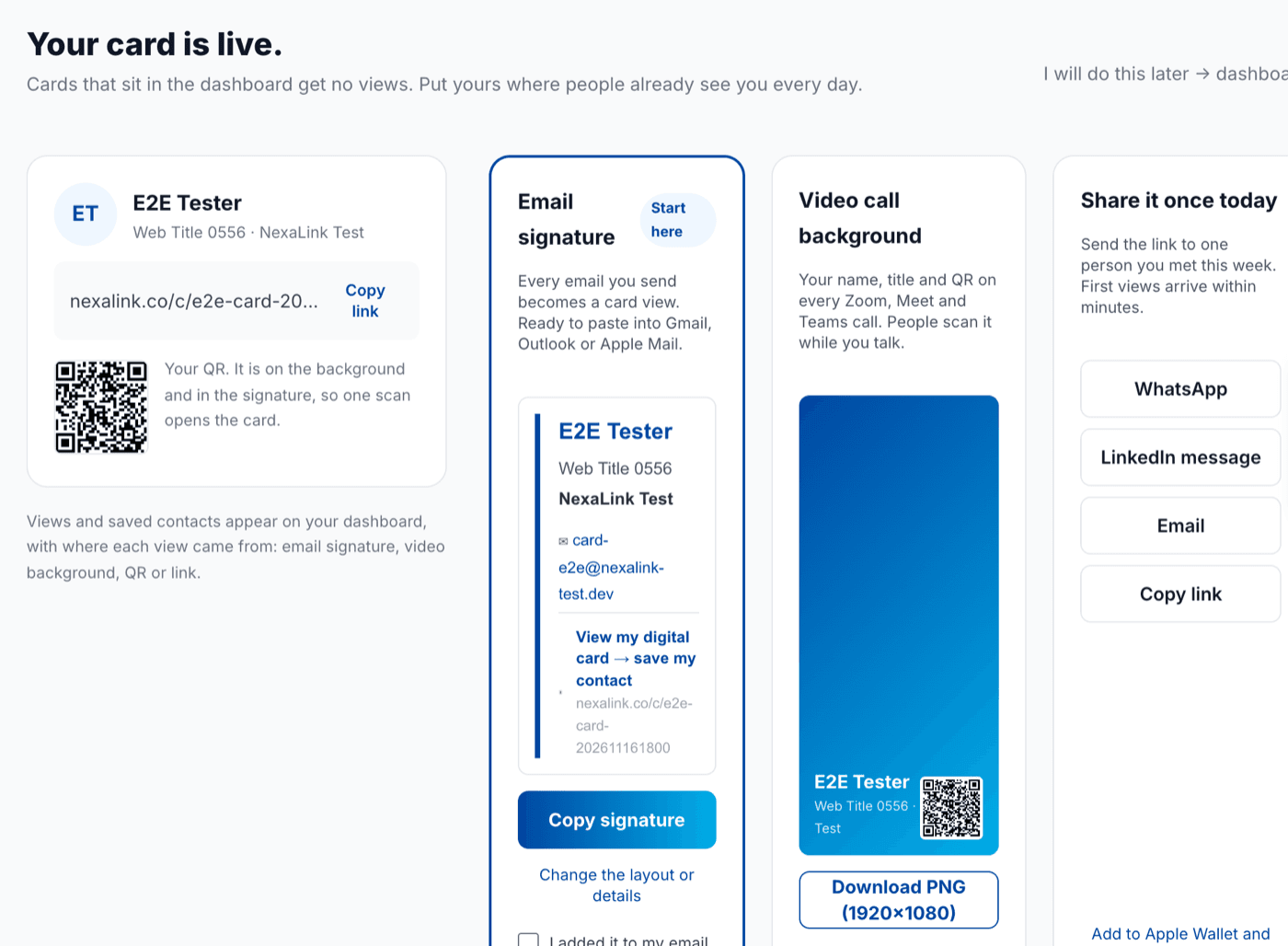
Your digital card holds your details, your license no. and one clear offer: “Get the aftercare guide”.
- 2
A visitor shares name and phone to get the offer. Email is optional. No app to install.
- 3
The request lands in Leads, tagged with the placement that brought it.
- 4
Call, message, WhatsApp or email from the contact page, then set a status.
The digital business card for doctors and clinics
A clinic card has two readers. Patients want to know that you are qualified, where you are and how to book. Referring doctors want your specialty and a direct way to reach you.
Keep it factual. Credentials, clinic hours and a booking link do more than any claim about results.
More on the card itself: NexaLink Card · cards by profession
What to put on it
- Name, degrees and specialty, with your license or registration number
- Clinic name, address, hours and the front-desk phone
- A booking button that opens your scheduling page
- Languages spoken and whether you see new patients
- A short line for referring doctors, with a direct contact
Lead capture: give people a reason to share details
The offer should be general information that helps anyone, not advice for one person. An aftercare guide or a first-visit checklist fits. A symptom questionnaire does not.
The form asks for a name and a phone number, with email optional. Do not add fields about conditions or treatment, and tell front-desk staff not to put clinical notes on a lead.
In the lead kit the starting offer for doctors and clinics is “Get the aftercare guide”. You add the link it opens. A visitor who wants it shares name and phone, the link opens right away, and the request appears in your Leads.
Offers that work in this trade
- A general aftercare guide for a common procedure
- What to bring to a first appointment
- Clinic hours, parking and insurance information
- A booking link for the next available slot
The button can say “Book an appointment” instead and open a link you choose, such as your calendar.
The lead kit: where to place your card, and what each placement brings
The lead kit turns one card into ten ready-made placements. Every link and QR carries its own source, so each lead shows where it came from. These are the placements that fit doctors and clinics best.
The website button on Google Business Profile
People comparing clinics nearby tap through to your card, see your credentials and can book or save the number. The kit also gives you text for a weekly post.
Shows in Leads as: Google Business Profile
A sticker or stand at reception
Patients scan while they wait, save the clinic number and get the aftercare guide. When it is time to rebook, your number is already in their phone.
Shows in Leads as: QR kit
The clinic's WhatsApp Business profile and a /card quick reply
When someone asks for the address or a booking link, the front desk replies with the card. Patients forward it to family members who need the same details.
Shows in Leads as: WhatsApp Business
A printed card for referring doctors
Leave cards with the QR on the back at nearby practices. A colleague scans it once and has your direct line for the next referral.
Shows in Leads as: Printable business card
All ten placements in the kit
- Email signature · Gmail · Outlook · Apple Mail
- Video-call background · Zoom · Meet · Teams
- QR kit · Table tent · Sticker · Desk stand
- LinkedIn banner + link · Banner · Featured · Contact info
- WhatsApp Business · Profile · Status · Quick reply
- Instagram bio + story · Bio link · Story · Highlight
- Wallet pass · Apple Wallet · Google Wallet
- Printable business card · QR on the back
- Event badge · Conferences · Meetups · Campus drives
- Google Business Profile · Website button · Weekly post
The email signature
Clinic email goes to patients, suppliers and other doctors. A signature with your credentials and a booking button makes each message a way back to the front desk.
The healthcare signature starts with a short notice you can edit. A notice does not make email secure, so keep clinical details in your patient portal or practice system and use email for logistics.
The healthcare preset starts with this notice, which you can edit or remove: “This email is not medical advice. In an emergency, call 911.”
Try it without an account: free email signature generator
EC | Dr. Emily Carter Consultant Dermatologist · Clearskin Clinic +1 (415) 555-0134 · emily@clearskinclinic.com · clearskinclinic.com 4.9 ★ · 380 patient reviews MD, FAAD · Board-certified dermatologist | ||
| |||
| Saturday clinic now open, 9 am to 1 pm. → | |||
| This email is not medical advice. In an emergency, call 911. | |||
A landing page linked from your card
Patients often want to read about a doctor before booking. A small landing page gives them your background, the conditions you treat and how to make an appointment, in one place.
Use Home for what the clinic does and the booking button, About for qualifications and the team, and Contact for location, hours and a simple enquiry form that asks for no health details.
What it is today: a small site with Home, About and Contact pages and a lead form, linked from your card, with visit and lead counts for you as the owner. It is an add-on for paid plans: anyone on a paid plan can build a draft, and publishing needs the add-on on the account.
Follow-up: what to do with each lead
Following up a clinic enquiry is front-desk work, and it is mostly about not letting a request sit. Someone who asked to book and heard nothing will book elsewhere.
Keep messages to logistics: times, directions, what to bring. If the conversation turns clinical, move it to a call or your secure system.
In NexaLink each lead has a contact page with one-tap Message, WhatsApp, Call and Email, a notes timeline and a status (new, active, nurturing, dormant, lost). If you use Claude or ChatGPT, you can connect them to your contacts over MCP and ask for a draft.
Related: a lead follow-up system · follow-up email generator · MCP access
- Same day
Reply to every booking request with two available times. A phone call is best for anyone who gave only a number.
- Day before
Confirm the appointment and send what to bring. Use the channel they chose.
- After the visit
If your policy allows it, send a general thank-you with the aftercare guide link. Mention nothing about the treatment.
- When due
Set the status to nurturing and contact them when a routine follow-up is due, in line with your consent practice.
A worked example: one week of leads
Illustration, not a result
Imagine a small dermatology clinic with a QR sticker at reception, the card on its Google Business Profile and a /card quick reply on the front-desk phone. The person and the leads below are made up to show how the pieces fit. Your numbers will differ.
What the week shows: the clinic collected names and numbers only, and nothing clinical passed through the card. The value was in being easy to rebook and easy to refer to.
Fair doubts
Is this HIPAA compliant?
Do not use the card or the lead form for protected health information. Collect a name and a phone number, keep clinical information in your practice system, and ask your compliance adviser how a contact tool fits your obligations. We make no claim that the product is a HIPAA-covered service.
We already have a booking system.
Keep it. The card's booking button can open your existing scheduling page. The card's job is to make the clinic easy to save, find and forward.
What about patients without a smartphone?
Keep doing what you do now: appointment cards and a phone number. The QR is an extra for the people who prefer it.
Rules worth checking
In the United States, the HIPAA Privacy Rule defines marketing as a communication that encourages someone to buy or use a product or service, with exceptions that include treatment communications. A covered entity generally needs an authorization to use protected health information for marketing.
The definitions say that individually identifiable health information includes demographic information collected from an individual. That is why this guide keeps the lead form to name and phone and keeps clinical detail out of messages. Other countries have their own rules.
Google's Business Profile guidelines treat doctors as individual practitioners who may have their own profile, and allow a title or degree in the name.
This is general information, not legal advice. Rules differ by state and country, so check with your regulator or firm.
What is free and what is paid
- 1 digital card, 3 templates
- Up to 25 contacts
- One lead kit on your main card: the placements, your license no. and offer capture
- Views and leads for the last 30 days, as totals
- Your card carries NexaLink branding
- Up to 5 cards, unlimited contacts
- Lead capture form and NFC sharing
- Apple and Google Wallet passes
- Your own domain and custom link
- No NexaLink branding on your card
- See who viewed your card, 90 days of analytics
- Import and export contacts
- A lead kit on every card, with views and leads per placement
- Minimum 3 users
- Everything in Pro for every user
- Shared team directory and dashboard
- One brand template for every card
- CSV export and priority support
See all Card plans → · how pricing compares · NexaLink and other card apps
What customers say
I find NexaLink great for making lead capture easier for my business. I like their fast and professional service, especially the quick fixes to problems. Everything is good, and the initial setup was very easy.
Nexalink brings a genuinely innovative approach to digital business cards by combining networking with AI. What impressed me most is its MCP integration, which makes syncing and leveraging contact data across AI tools much more seamless and efficient. … They took the time to work with me personally to tailor the experience to my needs.
How to set it up
- 1Create your digital card
Add your name, role, contact details and your license no.. One card is free.
- 2Set the offer
Pick what a visitor gets for sharing name and phone. The preset for doctors and clinics is “Get the aftercare guide”; add the link it should open.
- 3Put the first placement live
The website button on Google Business Profile. People comparing clinics nearby tap through to your card, see your credentials and can book or save the number. The kit also gives you text for a weekly post.
- 4Follow up from Leads
Each request appears in Leads with the placement that brought it. Call, message or email from the contact page and set its status.
Questions doctors and clinics ask
What should a doctor put on a digital business card?
Name, degrees, specialty and license or registration number, the clinic's address, hours and phone, a booking button, and a direct contact for referring doctors.
Should I collect medical details on the form?
No. Ask for a name and phone number only. Anything about symptoms, conditions or treatment belongs in your practice system, not in a contact form.
How do QR codes work at a clinic reception?
The QR is a link to your card. A patient points their camera at it, the card opens in the browser, and they can save the clinic number or ask for the aftercare guide.
How do I get more referrals from other doctors?
Make yourself easy to refer to. Give colleagues a card with your specialty, a direct line and your booking details, and confirm back to them when you have seen the patient.
Can each doctor in the clinic have a card?
Yes. On the Team plan every clinician and the front desk can have a card with one clinic template.
Can I ask patients for a Google review from the card?
You can add a link to your review page on your card. Keep any request general and do not mention the person's treatment.
Build the healthcare pipeline once, then let it run
Create your card, set “Get the aftercare guide”, and put the first placement live. It takes a few minutes and it is free to start.
Build my healthcare lead kitKeep reading
- The healthcare lead kit: assets and sample signature
- How a digital business card gets you leads
- How doctors manage a referral network
- Digital business cards for dermatologists
- Digital business cards for dentists
- Digital cards for medical conferences
Reviewed November 25, 2026. Plans and prices on this page are read from the same source as the pricing page.