Lead generation for event venues and hospitality teams
Lead generation for venues and hospitality: from a brochure request to a booked date
Couples and planners shortlist venues long before they enquire. They scroll Instagram, look at Google photos, pick up a brochure at a fair and walk the room on a tour. By the time an enquiry form arrives, most of the deciding is done.
This guide puts a small step into each of those earlier moments: a card to save and a brochure to ask for, so you learn who is interested while you can still help them choose.
Free to start: one card and one lead kit. No payment details needed.
- Sample lead 1 · “Get the venue brochure”Instagram bio + story
- Sample lead 2 · “Get the venue brochure”Google Business Profile
- Sample lead 3 · “Get the venue brochure”QR kit
- Ericsson

- CIBC
- feeltop AG
- Sabarot

- Taylor Apartment Locator
- Archer Investors
- Nietz Sounds

In short
- Offer the brochure, with dates and capacities, in exchange for a name and phone number.
- Put the card in your Instagram bio and stories, and on Google Business Profile.
- Use a QR at tours, tastings and wedding fairs in place of a paper enquiry pad.
- Reply quickly on the channel the enquiry came in on, then follow a short sequence.
Where leads start for event venues and hospitality teams
A lead rarely begins on a form. It begins in one of a few everyday moments, and each of them needs a way for the other person to keep your details and leave theirs.
The Instagram scroll
Someone saves three venue posts in an evening. A story with a link sticker, or the link in your bio, lets them ask for the brochure while the venue is in front of them.
The local search
A planner searches for venues with a certain capacity nearby. Your Google Business Profile is the comparison page, and the website button is the next tap.
The tour or tasting
A couple walks the room with parents in tow. The parents are part of the decision and rarely on the email thread. A QR on the table lets everyone in the party save your details.
The wedding fair
Dozens of conversations in an afternoon, most of them two minutes long. A QR on the stand collects details from the people who do not want to queue for your enquiry pad.
One pipeline: card, capture, contacts, follow-up
The four parts below are separate tools in most setups. Here they are one chain, and each link passes the next one what it needs.
- 1
Your digital card holds your details, your proof line and one clear offer: “Get the venue brochure”.
- 2
A visitor shares name and phone to get the offer. Email is optional. No app to install.
- 3
The request lands in Leads, tagged with the placement that brought it.
- 4
Call, message, WhatsApp or email from the contact page, then set a status.
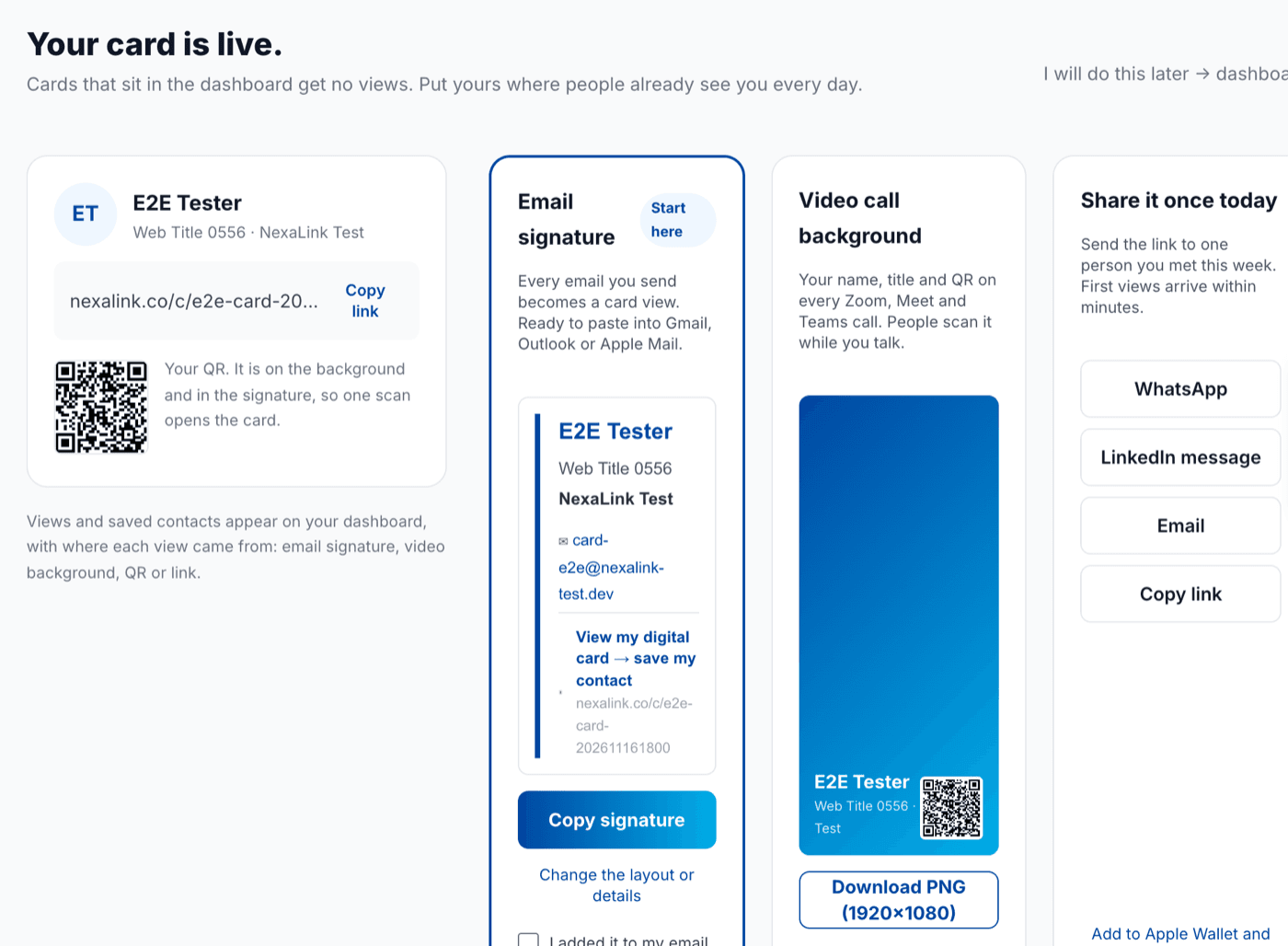
The digital business card for event venues and hospitality teams
A venue card is the short version of your brochure: what kind of events you host, for how many, where, and who to talk to.
Name a person. An enquiry is easier to send to a named person with a direct number than to a general inbox.
More on the card itself: NexaLink Card · cards by profession
What to put on it
- The venue name and the name of the person who handles enquiries
- Direct phone and the kinds of events you host
- Capacity range and location
- The offer button: brochure, or check dates
- A link to your gallery or Instagram
Lead capture: give people a reason to share details
The brochure is the natural offer. Everyone who is seriously comparing venues wants one, and it carries the detail your social posts cannot: capacities, packages and what is included.
If your calendar is the real constraint, switch the button to checking dates and point it at your availability or enquiry page.
In the lead kit the starting offer for event venues and hospitality teams is “Get the venue brochure”. You add the link it opens. A visitor who wants it shares name and phone, the link opens right away, and the request appears in your Leads.
Offers that work in this trade
- The venue brochure with packages and capacities
- Sample menus or a tasting invitation
- A floor plan with layout options
- A date check for a specific month
The button can say “Check dates” instead and open a link you choose, such as your calendar.
The lead kit: where to place your card, and what each placement brings
The lead kit turns one card into ten ready-made placements. Every link and QR carries its own source, so each lead shows where it came from. These are the placements that fit event venues and hospitality teams best.
Bio link, a story with a link sticker and a Contact highlight
People browsing venues tap through from your bio or story, save your contact and ask for the brochure. Save the story as a highlight so it stays on your profile.
Shows in Leads as: Instagram bio + story
The website button on Google Business Profile
Searchers comparing venues nearby land on your card and can request the brochure. The kit also gives you text for a weekly post.
Shows in Leads as: Google Business Profile
A table tent at tours, tastings and fair stands
Print the QR kit as a table tent or desk stand. Everyone in a touring party can scan it, not only the person who made the enquiry.
Shows in Leads as: QR kit
Under every enquiry reply and supplier email
Planners, photographers and caterers forward your emails to their clients. The signature gives those clients a direct route to your brochure.
Shows in Leads as: Email signature
All ten placements in the kit
- Email signature · Gmail · Outlook · Apple Mail
- Video-call background · Zoom · Meet · Teams
- QR kit · Table tent · Sticker · Desk stand
- LinkedIn banner + link · Banner · Featured · Contact info
- WhatsApp Business · Profile · Status · Quick reply
- Instagram bio + story · Bio link · Story · Highlight
- Wallet pass · Apple Wallet · Google Wallet
- Printable business card · QR on the back
- Event badge · Conferences · Meetups · Campus drives
- Google Business Profile · Website button · Weekly post
The email signature
Venue teams email couples, planners and suppliers all day. Suppliers matter most here: a florist or photographer who works your room often is a steady source of recommendations.
Use the banner line for what is seasonal, such as open dates or a showcase evening, and update it when the season changes.
Try it without an account: free email signature generator
EC | Emily Carter Events Lead · The Grand Terrace +1 (415) 555-0134 · emily@grandterrace.com · grandterrace.com 4.7 ★ · 900 guest reviews Hosting 300+ weddings and offsites a year | ||
| |||
| Wedding season: book by Dec 31 and get 10% off. → | |||
A landing page linked from your card
Not every enquirer wants to wade through a full website. A small landing page gives a planner the essentials on one screen.
Use Home for the room, the capacity and the brochure button, About for the team and what makes the venue yours, and Contact for the enquiry form and directions.
What it is today: a small site with Home, About and Contact pages and a lead form, linked from your card, with visit and lead counts for you as the owner. It is an add-on for paid plans: anyone on a paid plan can build a draft, and publishing needs the add-on on the account.
Follow-up: what to do with each lead
Venue enquiries are compared side by side, often the same evening. The first helpful reply sets the tone for the rest.
Reply on the channel they used. Someone who came from Instagram expects a message, not a formal letter.
In NexaLink each lead has a contact page with one-tap Message, WhatsApp, Call and Email, a notes timeline and a status (new, active, nurturing, dormant, lost). If you use Claude or ChatGPT, you can connect them to your contacts over MCP and ask for a draft.
Related: a lead follow-up system · follow-up email generator · MCP access
- Same day
Reply on the same channel. Confirm the brochure arrived and ask for their date, guest count and what matters most.
- Next day
A short nudge with two tour times. Offer a call if they are planning from a distance.
- Day 4 to 5
Try a different channel once. If they messaged, send an email, or the other way round.
- One week
A last friendly note with an easy way to say no. Then set the status to nurturing or lost.
A worked example: one week of leads
Illustration, not a result
Imagine a venue with the bio link set, a story highlight, the card on Google Business Profile and a table tent in the showroom. The person and the leads below are made up to show how the pieces fit. Your numbers will differ.
What the week shows: the enquiries came in on four different channels, and the reply went back on the same one each time. The tags show that Instagram and tours behave differently, which helps decide where to spend the next month's effort.
Fair doubts
We already get enquiries from listing sites.
Keep those. They catch people who are ready to enquire. The card catches earlier interest, on your own channels, and those leads are yours and not shared with other venues on the same listing.
Our team shares one inbox.
On the Team plan each person has a card and there is a shared directory and dashboard. A smaller team can start with one card for the events lead.
Can it tell a wedding fair lead from a tour lead?
Both show as QR kit, because the tag records the placement. Add a note with the fair or tour name when the lead arrives.
Rules worth checking
Follow-up by email in the United States is covered by the CAN-SPAM Act: identify yourself accurately, include a postal address and give a working way to opt out.
WhatsApp's business policy says a business may message people only after receiving their opt-in, and must respect requests to stop.
Google's Business Profile guidelines ask that the business name on the profile matches the real-world name, without added taglines or keywords.
This is general information, not legal advice. Rules differ by state and country, so check with your regulator or firm.
What is free and what is paid
- 1 digital card, 3 templates
- Up to 25 contacts
- One lead kit on your main card: the placements, your proof line and offer capture
- Views and leads for the last 30 days, as totals
- Your card carries NexaLink branding
- Up to 5 cards, unlimited contacts
- Lead capture form and NFC sharing
- Apple and Google Wallet passes
- Your own domain and custom link
- No NexaLink branding on your card
- See who viewed your card, 90 days of analytics
- Import and export contacts
- A lead kit on every card, with views and leads per placement
- Minimum 3 users
- Everything in Pro for every user
- Shared team directory and dashboard
- One brand template for every card
- CSV export and priority support
See all Card plans → · how pricing compares · NexaLink and other card apps
What customers say
I find NexaLink great for making lead capture easier for my business. I like their fast and professional service, especially the quick fixes to problems. Everything is good, and the initial setup was very easy.
Nexalink brings a genuinely innovative approach to digital business cards by combining networking with AI. What impressed me most is its MCP integration, which makes syncing and leveraging contact data across AI tools much more seamless and efficient. … They took the time to work with me personally to tailor the experience to my needs.
How to set it up
- 1Create your digital card
Add your name, role, contact details and your proof line. One card is free.
- 2Set the offer
Pick what a visitor gets for sharing name and phone. The preset for event venues and hospitality teams is “Get the venue brochure”; add the link it should open.
- 3Put the first placement live
Bio link, a story with a link sticker and a Contact highlight. People browsing venues tap through from your bio or story, save your contact and ask for the brochure. Save the story as a highlight so it stays on your profile.
- 4Follow up from Leads
Each request appears in Leads with the placement that brought it. Call, message or email from the contact page and set its status.
Questions event venues and hospitality teams ask
How do I put a QR code on a venue brochure or stand?
Download the QR kit as a print-ready PDF and place it on your stand, table or printed brochure. The QR opens your card with the brochure offer first.
What should a venue sales manager's email signature include?
Name, role, venue, direct phone, one clear action such as “Get the venue brochure”, and a seasonal line about open dates if you have them.
How many times should I follow up a venue enquiry?
Three or four touches over a week is a reasonable pattern: a same-day reply, a next-day nudge, one try on another channel and a final friendly note.
How do I know which channel an enquiry came from?
Each placement has its own source, so a lead is tagged Instagram bio + story, Google Business Profile, QR kit or Email signature. For the specific fair or listing, add a note.
Can a digital card replace our enquiry form?
It does a different job. The card collects a name and phone number quickly. Your enquiry form can ask for the date and guest count afterwards, and you can link to it from the card.
Can caterers and planners use this too?
Yes. The events and hospitality kit suits anyone who sells dates: caterers, planners, hotels' event teams. Change the offer to a sample menu or a planning checklist.
Build the events and hospitality pipeline once, then let it run
Create your card, set “Get the venue brochure”, and put the first placement live. It takes a few minutes and it is free to start.
Build my events and hospitality lead kitKeep reading
- The events and hospitality lead kit: assets and sample signature
- How a digital business card gets you leads
- Digital business cards for event planners
- Digital business cards for wedding planners
- Digital cards for wedding vendors
- Digital cards for restaurants and hospitality
- Google Business Profile and a digital card
Reviewed November 25, 2026. Plans and prices on this page are read from the same source as the pricing page.