Lead generation for retail shops and D2C brands
Lead generation for retail and D2C: turn one sale into a customer you can reach again
For a shop or a small brand, the cheapest customer is the one who has already bought. The trouble is that most of them leave no trace: they paid at the counter or through a marketplace, and you have no way to tell them about the next thing.
This guide builds a small, permission-based list from the moments you already have: the package in their hands, the queue at the till and the scroll through your Instagram.
Free to start: one card and one lead kit. No payment details needed.
- Sample lead 1 · “Get 10% off your first order”QR kit
- Sample lead 2 · “Get 10% off your first order”Instagram bio + story
- Sample lead 3 · “Get 10% off your first order”Wallet pass
- Ericsson

- CIBC
- feeltop AG
- Sabarot

- Taylor Apartment Locator
- Archer Investors
- Nietz Sounds
In short
- Give buyers a reason to leave their details: a discount on the next order.
- Put a QR on every package and at the counter.
- Use the Instagram bio link for followers who have not bought yet.
- Message only people who opted in, and make it easy to stop.
Where leads start for retail shops and D2C brands
A lead rarely begins on a form. It begins in one of a few everyday moments, and each of them needs a way for the other person to keep your details and leave theirs.
The unboxing
A customer opens the parcel and likes what is inside. That is the best moment to ask for anything. A sticker with a QR and an offer for the next order is seen by every buyer. If you sell through a marketplace, check its rules on package inserts first.
The counter
People wait while an order is packed or a coffee is made. A small stand by the till gives them something to do with their phone that helps you both.
The Instagram follow
Followers like your posts for months without buying. A link in the bio with a first-order offer gives them a reason to act.
The market stall or pop-up
You meet many people who like the product and will not carry it home today. A QR lets them take the shop with them.
One pipeline: card, capture, contacts, follow-up
The four parts below are separate tools in most setups. Here they are one chain, and each link passes the next one what it needs.
- 1
Your digital card holds your details, your proof line and one clear offer: “Get 10% off your first order”.
- 2
A visitor shares name and phone to get the offer. Email is optional. No app to install.
- 3
The request lands in Leads, tagged with the placement that brought it.
- 4
Call, message, WhatsApp or email from the contact page, then set a status.
The digital business card for retail shops and D2C brands
A shop's card is its contact page in one screen: what you sell, where to find you, how to order and how to get in touch.
Write it in the voice of the shop. One line about what makes the product yours is worth more than a list of categories.
More on the card itself: NexaLink Card · cards by profession
What to put on it
- Shop or brand name and what you sell, in one line
- A link to the online store or menu
- Address and opening hours, if you have a physical shop
- The offer button: the first-order or next-order discount
- Instagram and a WhatsApp or phone number for orders
Lead capture: give people a reason to share details
Retail customers expect something for their details, and a discount on the next order is the clearest trade. It costs you nothing unless they buy again.
Set the offer link to the page or code you want them to use. Say at the point of sign-up that you will send occasional offers, so the permission is clear.
In the lead kit the starting offer for retail shops and D2C brands is “Get 10% off your first order”. You add the link it opens. A visitor who wants it shares name and phone, the link opens right away, and the request appears in your Leads.
Offers that work in this trade
- A discount code for the next order
- Early access to a new product or seasonal batch
- A free sample or add-on with the next purchase
- A reorder link for the item they just bought
The button can say “Shop the new roast” instead and open a link you choose, such as your calendar.
The lead kit: where to place your card, and what each placement brings
The lead kit turns one card into ten ready-made placements. Every link and QR carries its own source, so each lead shows where it came from. These are the placements that fit retail shops and D2C brands best.
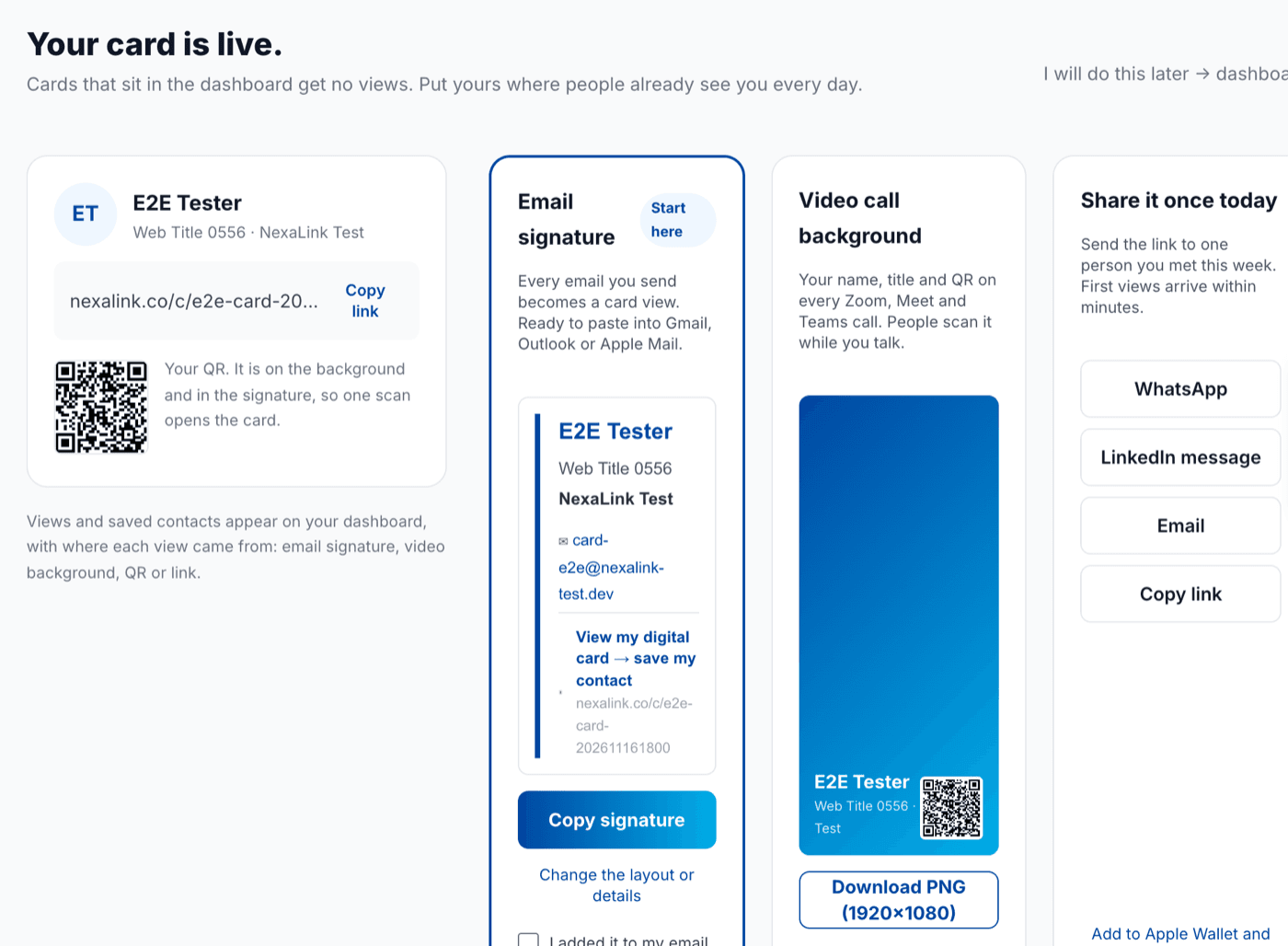
A sticker on every package and a stand at the counter
Print the QR kit as stickers for parcels and a desk stand for the till. Customers scan, save the shop and get the offer for their next order.
Shows in Leads as: QR kit
Shop bio link, a product story with a link sticker and a highlight
Followers tap through from your bio or a story, save your contact and claim the first-order offer.
Shows in Leads as: Instagram bio + story
A wallet pass on the shop phone at markets and pop-ups
Show the QR from the lock screen while serving. Stall visitors scan it and take the shop with them.
Shows in Leads as: Wallet pass · Wallet passes need a paid plan
The website button on Google Business Profile
For shops with a physical location, people searching nearby land on your card and can save you or see the offer.
Shows in Leads as: Google Business Profile
All ten placements in the kit
- Email signature · Gmail · Outlook · Apple Mail
- Video-call background · Zoom · Meet · Teams
- QR kit · Table tent · Sticker · Desk stand
- LinkedIn banner + link · Banner · Featured · Contact info
- WhatsApp Business · Profile · Status · Quick reply
- Instagram bio + story · Bio link · Story · Highlight
- Wallet pass · Apple Wallet · Google Wallet
- Printable business card · QR on the back
- Event badge · Conferences · Meetups · Campus drives
- Google Business Profile · Website button · Weekly post
The email signature
A small brand sends more email than it thinks: order confirmations written by hand, replies to questions, wholesale enquiries, supplier threads.
A signature with the shop's card and the current offer makes each of those a small shop window. Use the banner line for what is new this week.
Try it without an account: free email signature generator
Emily Carter Founder Ridgeline Coffee +1 (415) 555-0134 · emily@ridgelinecoffee.com · ridgelinecoffee.com 4.8 ★ · 2,100 reviews Single-origin coffee from Colombia and Ethiopia | Scan to save my contact |
| Free shipping on orders over $50. → | |
A landing page linked from your card
If you sell through a marketplace or mainly on Instagram, you may have no page that is simply yours. A small landing page linked from your card fills that gap.
Use Home for what you sell and the offer, About for the story behind the product, and Contact for wholesale and customer enquiries.
What it is today: a small site with Home, About and Contact pages and a lead form, linked from your card, with visit and lead counts for you as the owner. It is an add-on for paid plans: anyone on a paid plan can build a draft, and publishing needs the add-on on the account.
Follow-up: what to do with each lead
Retail follow-up is light. Nobody wants a sales sequence from a coffee roaster. One thank-you, one reminder when they are likely to run out, and news when there is real news.
Only message people who opted in, on the channel they chose, and stop when they ask.
In NexaLink each lead has a contact page with one-tap Message, WhatsApp, Call and Email, a notes timeline and a status (new, active, nurturing, dormant, lost). If you use Claude or ChatGPT, you can connect them to your contacts over MCP and ask for a draft.
Related: a lead follow-up system · follow-up email generator · MCP access
- Right away
The offer link opens as soon as they share their details. Nothing for you to do.
- After a few days
A short thank-you, with a tip for using or storing what they bought.
- When they are due
A reminder around the time a regular buyer would reorder, with the reorder link.
- When there is news
A new product or seasonal batch. Keep it occasional and set the status of anyone who goes quiet to dormant.
A worked example: one week of leads
Illustration, not a result
Imagine a small coffee roaster that ships online, has a counter in a shared shop and a QR sticker on every bag. The person and the leads below are made up to show how the pieces fit. Your numbers will differ.
What the week shows: most of the list came from people who had already bought, through the sticker on the bag. The wholesale lead came from search. Seeing them apart tells the roaster what each placement is good for.
Fair doubts
My store platform already collects emails at checkout.
It does, for people who buy on your own site. The card reaches the rest: walk-in customers, stall visitors and followers who have not bought yet.
We sell online only. Does Google Business Profile apply?
Usually not. Google's guidelines require a business to make in-person contact with customers, so an online-only brand should skip that placement and use packaging and Instagram.
Will people really scan a sticker on a box?
Not all of them. The ones who do have just received something they like and are being offered a saving on the next one, which is a good reason.
Rules worth checking
Promotional email in the United States falls under the CAN-SPAM Act: be clear that the message is from you, include a postal address and provide an opt-out that works.
WhatsApp's business policy requires opt-in before you message someone, and restricts some product categories.
Google's Business Profile guidelines require that a business makes in-person contact with customers during its stated hours, which rules out online-only brands.
This is general information, not legal advice. Rules differ by state and country, so check with your regulator or firm.
What is free and what is paid
- 1 digital card, 3 templates
- Up to 25 contacts
- One lead kit on your main card: the placements, your proof line and offer capture
- Views and leads for the last 30 days, as totals
- Your card carries NexaLink branding
- Up to 5 cards, unlimited contacts
- Lead capture form and NFC sharing
- Apple and Google Wallet passes
- Your own domain and custom link
- No NexaLink branding on your card
- See who viewed your card, 90 days of analytics
- Import and export contacts
- A lead kit on every card, with views and leads per placement
- Minimum 3 users
- Everything in Pro for every user
- Shared team directory and dashboard
- One brand template for every card
- CSV export and priority support
See all Card plans → · how pricing compares · NexaLink and other card apps
What customers say
I find NexaLink great for making lead capture easier for my business. I like their fast and professional service, especially the quick fixes to problems. Everything is good, and the initial setup was very easy.
Nexalink brings a genuinely innovative approach to digital business cards by combining networking with AI. What impressed me most is its MCP integration, which makes syncing and leveraging contact data across AI tools much more seamless and efficient. … They took the time to work with me personally to tailor the experience to my needs.
How to set it up
- 1Create your digital card
Add your name, role, contact details and your proof line. One card is free.
- 2Set the offer
Pick what a visitor gets for sharing name and phone. The preset for retail shops and D2C brands is “Get 10% off your first order”; add the link it should open.
- 3Put the first placement live
A sticker on every package and a stand at the counter. Print the QR kit as stickers for parcels and a desk stand for the till. Customers scan, save the shop and get the offer for their next order.
- 4Follow up from Leads
Each request appears in Leads with the placement that brought it. Call, message or email from the contact page and set its status.
Questions retail shops and D2C brands ask
What should a QR code on packaging link to?
To something worth the scan: an offer on the next order, a reorder link or care instructions. In the lead kit it opens your card with the offer first, so the customer can also save your shop.
Should a shop use a digital business card or a link-in-bio page?
They do different jobs and can sit together. A link page lists links. A card can be saved as a contact and lets a customer leave their details, which is what builds a list.
How do I collect customer details at the counter without slowing the queue?
Put a small QR stand by the till with the offer printed on it. Customers scan while they wait, and nobody at the counter has to type anything.
How do I tell whether a scan came from the packaging or the shop window?
Scans from the QR kit share one tag, QR kit. Instagram, Google Business Profile and wallet scans are tagged separately. If you need to split packaging from the counter, add a note or use a second card.
Do I need permission to message a customer about a new arrival?
Yes, treat it that way. Tell people when they sign up that you will send occasional offers, message only those who agreed and stop when asked.
Is the wallet pass free?
Wallet passes are on paid plans. On the free plan, open your card on the shop phone to show its QR, or print the QR kit.
Build the retail and D2C pipeline once, then let it run
Create your card, set “Get 10% off your first order”, and put the first placement live. It takes a few minutes and it is free to start.
Build my retail and D2C lead kitKeep reading
- The retail and D2C lead kit: assets and sample signature
- How a digital business card gets you leads
- Digital cards for retail stores
- Lead generation for small businesses
- Free QR code business card maker
- A digital card and Linktree compared
Reviewed November 25, 2026. Plans and prices on this page are read from the same source as the pricing page.